Command-S Boot into Single User Mode
Command-V Boot using "Verbose" mode (shows all kernel and startup
console messages)
X Reset startup disk selection and boot into Mac OS X Server
Shift Boot into "Safe Boot" mode, which runs Disk First Aid. A reboot
will be required afterward.
Option Boot into Open Firmware to select a boot device
Command-Option-Shift-Delete Bypass internal harddrive on boot
T Boot into Firewire target disk mode
C Boot from the internal optical drive
N Start from the Network (NetBoot)
Command-Option-P-R Reset Parameter RAM (PRAM) and non-volatile RAM (NVRAM)
(mouse button) Eject (internal) removable media
ALSO: if you use open firmware password... you'll need this:
Startup Manager -accessed by pressing the Option key during startup
Enter commands after starting up in Open Firmware -press
Command-Option-O-F key combination during startup.
http://docs.info.apple.com/article.html?artnum=106482
How to troubleshoot a computer with Open Firmware Password enabled
If you cannot access the Open Firmware Password application and need
to troubleshoot your computer by:
Resetting the PRAM
Starting up in Single-user mode
Starting up in Verbose mode
Starting from CD-ROM
Then follow these steps:
Start up into Open Firmware by pressing and holding the
Command-Option-O-F key combination during startup.
At the Open Firmware prompt, type: reset-nvram
Press Return.
When prompted for your password, enter it and press the Return key. It
responds OK.
At the Open Firmware prompt, type: reset-all
Press Return.
The computer restarts and you are now be able to reset the PRAM and
startup in Single-user mode, Verbose mode, or from CD-ROM.
2007年6月13日 星期三

Mac Mini DVI 顯示的毛病
MacMini 的 display 怪現象,用 DVI 接頭連上 LCD display,開機的時候正常顯示,但打完帳號密碼以後,螢幕就出現 out-of-range 的錯誤訊息,無法顯示。但改用 VGA 顯示,則又正常。看來是 DVI 部分出了問題,上網找了一些同樣症狀的文章。
看來主要是 MacMini 顯示系統的問題,不是新買的 LG 22'' LCD 的問題。
國外的:
http://ask.metafilter.com/19259/My-Mac-Mini-Display-Detection-Dilemma
國內的:
Benq 22 吋,有問題
接電漿,有問題
Apple 網站相關解決方法
http://discussions.apple.com/forum.jspa?forumID=761
***** http://www.macosxhints.com/article.php?story=2001100114532165
http://forums.macosxhints.com/showthread.php?t=8235
http://docs.info.apple.com/article.html?artnum=42642
例如用 OSXVNC, 我也裝了。但改了一堆顯示模式,我的 LCD panel 仍無動於衷。
用 Shift 鍵壓著開機,好像也沒用。開機會恢復成 640x480,可以執行 login 畫面,但 login 後還是偵測錯誤。
====
If you have more than one machine and they're networked, you can fix this by using a remote control program such as Timbuktu or (my choice) OSXvnc. The nice thing about OSXvnc is that it can be started from the command line. So when I blacked my monitor (by selecting a too high refresh rate, which instantly took effect permanently - argh!), I did the following: SSH'd in from my iBook and launched OSXvnc from the command line (OSXvnc.app -rfbport portnumber). Then I quit the SSH session and launched my VNC client and connected to the now remotely-controllable dead screen Mac. The last step is too open the Displays panel, select a valid refresh rate, and watch the screen come back to life on the Mac. Saves a reboot and keeps that all important "uptime" stat going ;-). -rob.
===
If you hold the shift key down at startup, OS X will reset the monitor configuration to a default value. I've added this tip to the main body of this hint, along with the reference to the MacNN forum where it was first discussed. Adding this comment just to move the hint to the top of the "What's New?" box. :-)
===
I ran into the "out ot scan range" problem on my new G4 733 which is hooked up to my old Apple 20" monitor. It took me three hours of researching on the net and trying all sorts of things until I found the trick about deleting the com.apple.windowserver.plist trick. The "boot with shift key down" solution seems the most elegant solution, but here are two other things I discovered that may help in other scenarios:
1. you can hold dowm command-S on startup to get into console mode before the screen resolution settings are applied.
2. of all the CDs that came with my G4, only the OS 9 Install CD allowed me to get to the desktop where I was able to move the com.apple.windowserver.plist file to another location.
=====
besides
/Library/Preferences/com.apple.windowserver.plist
I also needed to trash
/Users/[yourusername]/Library/Preferences/ByHost/
com.apple.windowserver.biguglynumber.plist
then it worked fine.
Otherwise the resolution changed back to the invalid just before the
finder finished loading...maybe because of Jaguar, or because I had
auto-logon enabled.
cheers
====
--
當然,以上的解決方法都是自己設定錯誤的回覆方法,但我遇到的情形是
mac mini 無法正確偵測螢幕,導致解析度頻率等設定錯誤。
看來還是暫時用 DVI-VGA adaptor 擋一下。
看來主要是 MacMini 顯示系統的問題,不是新買的 LG 22'' LCD 的問題。
國外的:
http://ask.metafilter.com/19259/My-Mac-Mini-Display-Detection-Dilemma
國內的:
Benq 22 吋,有問題
接電漿,有問題
Apple 網站相關解決方法
http://discussions.apple.com/forum.jspa?forumID=761
***** http://www.macosxhints.com/article.php?story=2001100114532165
http://forums.macosxhints.com/showthread.php?t=8235
http://docs.info.apple.com/article.html?artnum=42642
例如用 OSXVNC, 我也裝了。但改了一堆顯示模式,我的 LCD panel 仍無動於衷。
用 Shift 鍵壓著開機,好像也沒用。開機會恢復成 640x480,可以執行 login 畫面,但 login 後還是偵測錯誤。
====
If you have more than one machine and they're networked, you can fix this by using a remote control program such as Timbuktu or (my choice) OSXvnc. The nice thing about OSXvnc is that it can be started from the command line. So when I blacked my monitor (by selecting a too high refresh rate, which instantly took effect permanently - argh!), I did the following: SSH'd in from my iBook and launched OSXvnc from the command line (OSXvnc.app -rfbport portnumber). Then I quit the SSH session and launched my VNC client and connected to the now remotely-controllable dead screen Mac. The last step is too open the Displays panel, select a valid refresh rate, and watch the screen come back to life on the Mac. Saves a reboot and keeps that all important "uptime" stat going ;-). -rob.
===
If you hold the shift key down at startup, OS X will reset the monitor configuration to a default value. I've added this tip to the main body of this hint, along with the reference to the MacNN forum where it was first discussed. Adding this comment just to move the hint to the top of the "What's New?" box. :-)
===
I ran into the "out ot scan range" problem on my new G4 733 which is hooked up to my old Apple 20" monitor. It took me three hours of researching on the net and trying all sorts of things until I found the trick about deleting the com.apple.windowserver.plist trick. The "boot with shift key down" solution seems the most elegant solution, but here are two other things I discovered that may help in other scenarios:
1. you can hold dowm command-S on startup to get into console mode before the screen resolution settings are applied.
2. of all the CDs that came with my G4, only the OS 9 Install CD allowed me to get to the desktop where I was able to move the com.apple.windowserver.plist file to another location.
=====
besides
/Library/Preferences/com.apple.windowserver.plist
I also needed to trash
/Users/[yourusername]/Library/Preferences/ByHost/
com.apple.windowserver.biguglynumber.plist
then it worked fine.
Otherwise the resolution changed back to the invalid just before the
finder finished loading...maybe because of Jaguar, or because I had
auto-logon enabled.
cheers
====
--
當然,以上的解決方法都是自己設定錯誤的回覆方法,但我遇到的情形是
mac mini 無法正確偵測螢幕,導致解析度頻率等設定錯誤。
看來還是暫時用 DVI-VGA adaptor 擋一下。
2007年6月12日 星期二
Prototype -- 外觀為重或技術可行性為重?
在很多技術評估會議裏面,常常會有很多實做型的工程師,從技術可行的角度來 demo prototype,解釋新產品或新專案的樣子,然而常會被冤枉準備不足。其實,以 prototype 來說,要看對象來做 prototype 才比較能抓得住 audience。對 business oriented 的使用者來說,漂亮而接近真實的畫面,但底層技術暫時空缺的 prototype 可能更具效果。不管是工程師或業務,要能分辨不同場合的需求,才能避免經常出現的誤解 -- 業務埋怨工程師準備不足、工程師埋怨業務只重表面功夫。而我的看法,當然是兩者兼具最好,但這樣的 prototype 成本也太高了,除非是單價很高的case才值得這麼高的初期銷售成本。
以 BPM 應用專案為例,當客戶提了很多功能需求,但工程師回來想 prototype 的時候,多半會傾向把技術面有疑問的議題,先以 prototype 型式做出樣子;以技術的角度來看,我也會認為這樣的 POC (proof-of-concept) 設計是有效果的。然而,面對非技術的使用者,看到這個 POC 多半會覺得: 啊,好簡陋的應用! 連初學者的畫面可能都比這個 POC 漂亮。所以,先了解 audience 的性質,或者事先溝通 prototype 的性質是 technical prototype or GUI prototype,才不會對牛彈琴。
以 BPM 應用專案為例,當客戶提了很多功能需求,但工程師回來想 prototype 的時候,多半會傾向把技術面有疑問的議題,先以 prototype 型式做出樣子;以技術的角度來看,我也會認為這樣的 POC (proof-of-concept) 設計是有效果的。然而,面對非技術的使用者,看到這個 POC 多半會覺得: 啊,好簡陋的應用! 連初學者的畫面可能都比這個 POC 漂亮。所以,先了解 audience 的性質,或者事先溝通 prototype 的性質是 technical prototype or GUI prototype,才不會對牛彈琴。
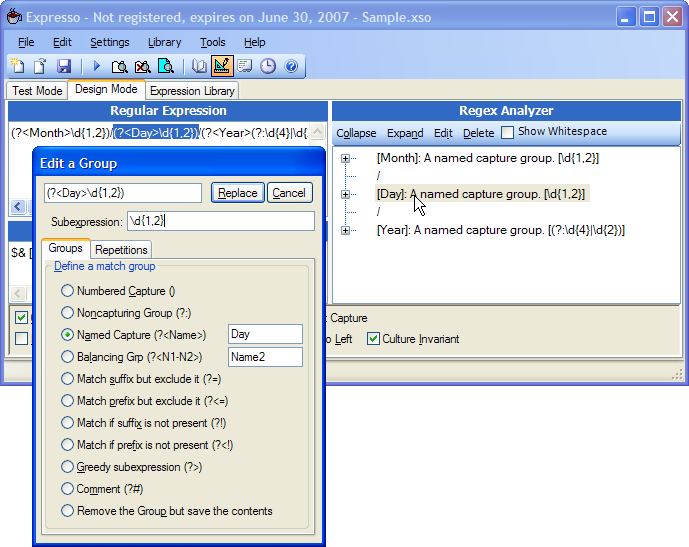
Good Regular Expression Building Tool - Expresso
十幾年前 (哇,已經是十幾年前的事了!) 為了UNIX系統管理,免不了要寫一堆 perl script;當然也免不了對 regular expression 作大量的使用。如何簡潔地使用 regular expression 來 match 許多字串,當然要靠經驗累積,即使是資深的 perl / regular expression 的使用者,對於複雜的 regular expression 也要事先測測看是否滿足自己的需求。
做 compiler 研究的時候,也曾跟 jwwang 學弟,一起討論過 regular expression build/test tool 的可行性。雖然這塊大餅是畫了,但因為 lexical scanner 畢竟只是研究中的一小塊,沒有付諸實行。看到 expresso 這個工具,令人想起了十幾年前的往事。雖然不再頻繁用到 regular expression,不過有這個工具,還是要多多推薦,因為對於程式開發者來說,如果在程式裡面會用到 regular expression,應該可以省下很多 build/test regular expression 的時間。
http://www.ultrapico.com/Expresso.htm
做 compiler 研究的時候,也曾跟 jwwang 學弟,一起討論過 regular expression build/test tool 的可行性。雖然這塊大餅是畫了,但因為 lexical scanner 畢竟只是研究中的一小塊,沒有付諸實行。看到 expresso 這個工具,令人想起了十幾年前的往事。雖然不再頻繁用到 regular expression,不過有這個工具,還是要多多推薦,因為對於程式開發者來說,如果在程式裡面會用到 regular expression,應該可以省下很多 build/test regular expression 的時間。
http://www.ultrapico.com/Expresso.htm
訂閱:
文章 (Atom)